

Core concepts
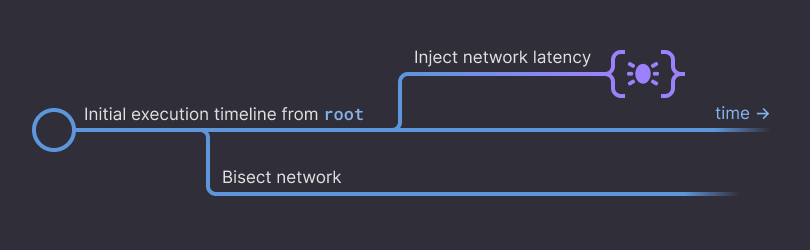
The resulting tree of timelines is the basis by which we interact with test results. To talk about this tree, we have a couple of terms:Event
An event is an occurrence within the simulation.Common examples include log messages generated by your system or by SDK assertions.
Every event occurs at a unique moment.
Moment
A moment is an immutable instant in the multiverse. Moments are specified by two parameters: one of them picks out a particular timeline, and the other indicates the time on that timeline.Moments are very granular in their segmentation of time. We believe they are more granular than users will ever need, but strictly speaking they’re not “dense” in the mathematical sense.
Every instant in a timeline is represented by a moment, including locations in the multiverse where no event occurred.
Branch
A branch is a mutable segment of a timeline. A branch starts at a moment and has a mutable pointer to an “end” moment.The “end” pointer can be moved forward by campaigns, growing a single timeline.
Campaign
A campaign extends a branch by executing actions in the simulation.These include things like running a bash command, playing the simulation forward a few seconds, or using other Antithesis builtin commands.
Campaigns are the exciting part. By running a campaign with an associated branch, you create new timelines in the multiverse.
An example
Let’s make this concrete: You’ve requested an interactive debugging session for a particular bug moment. Now you’d like to see the network traffic two seconds before the bug moment. To do this you take the following steps in the Antithesis Notebook: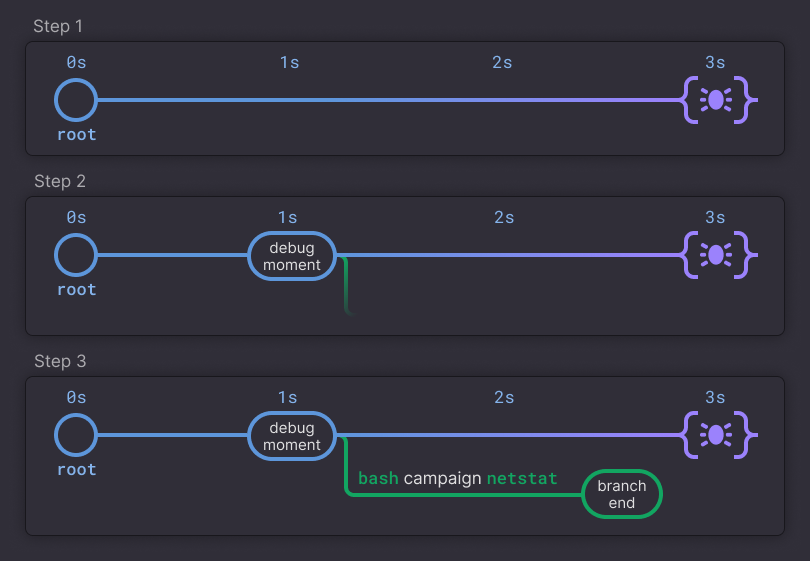
- You’re presented with the bug moment when the Notebook opens.
- You reference the moment two seconds back in its history using
Moment.rewindand spawn a new branch (represented in green). - You issue a
bashcampaign to run the bash commandnetstaton this branch, creating a new timeline.
Frequently used functions
The following gives you a working knowledge of the basic functions for moving around the multiverse. See our guide to The Environment and its utilities for documentation of capabilities like starting and stopping containers, running backgrounded bash commands, extracting files, and more. For powerful compositions of these tools check out our cookbook.Navigation functions
Go back in time
An instance method onmoment. It accepts a TimeInterval (see help(Time)) and returns the moment corresponding to a specified duration before the original moment.
Go to back to a specific time
An instance method onmoment. It returns the moment corresponding to a specified time along the path to the original moment.
The following actions extend a branch. They allow you to ask powerful hypothetical questions, but come with a catch: they create new timelines whose futures are independent of other branches.
Run a bash command
An instance method on bash strings. It uses the provided branch to run the bash command inside the provided container and advances the branch until the command exits. The new end moment of the branch will be the moment at which the command exited.help()
Run a bash command in background
An instance method on bash strings. It spawns a new process on the provided branch that runs the bash command in the background in the provided container. The new end moment of the branch will be the moment at which the command is delivered (it may or may not have started running).help()
Wait a duration of time
An instance method onbranch. It runs a campaign that extends the branch, running the simulation for some duration. It modifies the passed branch’s end moment by reference. It returns undefined.
Wait until a specific event
An instance method onbranch. It runs a campaign that extends the branch. It modifies the passed branch’s end moment by reference. It runs the simulation until some event occurs or until the optional timeout is reached.
It returns the first matching event or, in the case of a timeout, it returns undefined.
FATAL log, see our documentation on querying with event sets.
Conversion functions
These functions are basic utilities for setting up queries or campaigns. They do not themselves alter the tree of timelines.Moment to branch
An instance method onmoment. Creates a new branch beginning at a moment, which will have its own independent future. You might want to create a new branch in order to observe the state of your software without disturbing the original timeline of execution.
Convert a branch to a moment
A property onbranch. It represents the location in the tree that a new campaign on this branch would start from.
New branch from an existing one
An instance method onbranch. Creates a branch off of the end moment of another branch.
Querying the tree
To analyze the behavior of your system, you’ll need to see events coming out of the simulation. Events are things like log files written to our output sink, messages tostdout or stderr, and even system-level events like journald’s output. Available system events are documented in The Environment and its utilities.
If you have a branch with a bug, you can see all the events leading up to it by writing:
up_to is run on an EventSet it evaluates the set on a particular branch and produces an EventSequence. You can think of EventSets as abstract queries and EventSequences as their concrete results.
Composing these gets pretty powerful. To learn more, check out our documentation on querying with event sets, or see our in-product help by running help(EventSet).
Printing an EventSequence results in a log viewer UI, documented here.
We provide sugar for producing
EventSequences where possible. For example print(bash`echo hello`.run(...)) actually uses up_to under the hood to perform a query that selects precisely the output of your command.